What Is an SD Card?
An SD card is a tiny removable memory card for photos, video, apps, documents, firmware files, and device data. It is cheap, portable, and supported almost everywhere, which is why the format keeps turning up in cameras, drones, recorders, industrial gear, embedded products, and plenty of devices that do not need built-in storage.

The catch is that the right card is not always the one with the biggest number on the label. Capacity, speed class, bus interface, file system, endurance, and device compatibility all matter. For most everyday buyers, an SDXC card from a reliable SD card manufacturer is the safest mainstream choice. For bulk buyers, the sharper question is not “Which SD card is best?” It is “Which card will work reliably in my device, at my target cost, for the life of the project?”
What is an SD Card?
SD stands for Secure Digital. An SD card is a compact flash-memory card that stores data without needing power. The format was introduced in the late 1990s by the SD Association, and it has stuck around because it is easy to remove, easy to ship, and easy for hardware makers to support.
You will still find SD cards in digital cameras, camcorders, audio recorders, drones, gaming devices, surveillance equipment, medical devices, industrial controllers, toys, and other electronics. They are also handy for moving data between devices, preloading content, and keeping a removable backup.
Types of SD Cards: Capacity Is Only the Start
The SD family is divided by capacity standards. Those standards also determine the file system a card normally uses, which is one reason an older device may refuse to recognize a newer, larger card.

Here is the practical breakdown:
| Type | Capacity | Typical file system | What it means in practice |
| SD / SDSC | Up to 2 GB | FAT12 or FAT16 | Mostly for older devices. Do not choose this unless a legacy product requires it. |
| SDHC | 4 GB to 32 GB | FAT32 | Fine for basic cameras and older equipment, but limited by capacity and file size. |
| SDXC | 64 GB to 2 TB | exFAT | The mainstream choice for modern cameras, 4K video, and higher-capacity storage. |
| SDUC | 2 TB to 128 TB theoretical | exFAT | Future-facing, but not widely supported. Check device compatibility carefully. |
The compatibility caveat is the part buyers often miss. Many newer cards can work in older slots, but only if the device supports the card type and file system. If a device manual says SDHC only, a 128 GB SDXC card may not work no matter how good the card is.
How to Read the Label of SD Cards?
A full-size SD card is a small plastic rectangle, roughly 32 x 24 x 2.1 millimeters, with a beveled corner so you do not insert it the wrong way. The front label usually gives you the brand, capacity, card type, and speed ratings. The back has the gold contacts that actually move data.
Some high-performance cards, such as UHS-II models, add a second row of contacts. That row is not decorative. It enables faster bus speeds, but only when the host device supports the same interface.
Full-size SD cards usually include a small write-protect switch on the side. Slide it toward the contacts for normal read/write use, or away from the contacts to signal read-only mode. Treat it as a device signal, not a serious security feature, because behavior depends on the hardware reading the card.
Speed Classes: Watch the Minimum, Not the Big Number
Speed class tells you the minimum sustained write speed. That is different from the flashy best-case read speed printed in large type on many packages. The distinction matters. A card can look fast on the shelf and still drop frames during video recording if its sustained write speed is too low.
Minimum sequential write speed | Speed Class | Corresponding video format | |||||
Speed Class | UHS Speed Class | Video Speed Class | 8K Video | 4K Video | Full HD / HD video | Standard Video | |
90MB/sec |
II
| 
| |||||
60MB/sec |
II
| 
| |||||
30MB/sec |
/ I
| 
| |||||
10MB/sec |
/ I
| 
| |||||
6MB/sec | 
| ||||||
4MB/sec | |||||||
2MB/sec | |||||||
If you are recording video, pay closest attention to the V rating. If you are running apps or games from a microSD card in an adapter, look for A1 or A2. If you are buying for an embedded product, test the card in the actual device instead of trusting the label alone.
Bus Interface: The Speed Ceiling
The bus interface sets the theoretical maximum transfer speed between the card and the host device. Think of speed class as the card’s minimum promise and the bus interface as the road it travels on. Put a fast card in a slow device and the device still sets the limit.
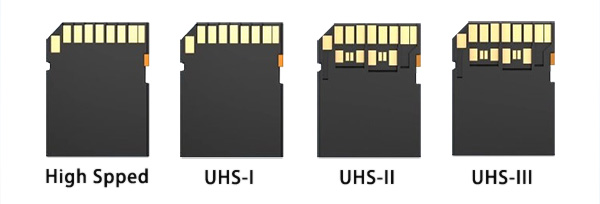
| Interface | Theoretical maximum | What to know |
| High Speed | Up to 25 MB/s | Older and basic devices. |
| UHS-I | Up to 104 MB/s | Common, affordable, and enough for many cameras and recorders. |
| UHS-II | Up to 312 MB/s | Useful for demanding photography and video if the device supports the second row of contacts. |
| UHS-III |
Up to 624 MB/s |
Less common. Check real device support before paying extra. |
What SD Cards Are Used For?
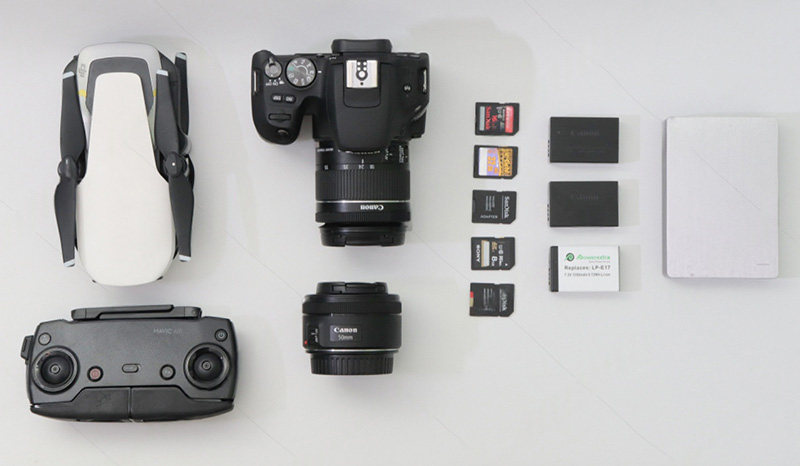
- Storage expansion. SD cards give cameras, recorders, industrial devices, and other hardware more room for photos, video, logs, firmware, and user files.
- Data transfer. A removable card is still one of the simplest ways to move files from a camera or device to a computer without pairing, syncing, or touching a cloud service.
- Backup and preloading. SD cards can hold backup copies, product content, maps, media libraries, configuration files, and factory-loaded data.
- Portable project storage. Their small size makes them easy to carry, replace, label, and ship with hardware.
Bulk Buying SD Cards Guide
Bulk purchasing SD cards is different from buying individual cards. Buying one SD card for a camera is simple enough. Buying thousands for a product, retail channel, or industrial deployment is where small mistakes get expensive.
- Start with the device, not the card. Confirm supported type, capacity, file system, speed class, and operating conditions.
- Test real workloads. Continuous writing, burst capture, firmware reads, and app storage stress cards in different ways.
- Prioritize consistency. In bulk, a stable bill of materials and repeatable performance can matter more than headline speed.
- Consider preloading and customization. Some projects need files, labels, packaging, serial control, or custom appearance.
- Plan for lifecycle. A slightly higher capacity or endurance rating may reduce replacement cost later.
- Choose a supplier that can deliver consistently. Lead time, quality control, and long-term availability are part of the product.
There is no universal best SD card for bulk purchasing. For toys and consumer electronics, compatibility and stable supply may matter most. For surveillance, dash cams, drones, and industrial equipment, endurance and temperature tolerance may matter more than price. For distribution or retail, mainstream capacities such as 32 GB, 64 GB, and 128 GB are usually easier to sell and manage.
Bottom Line
For everyday users, buy an SDXC card from a reputable SD card manufacturer, match the speed class to your workload, and skip bus speeds your device cannot use. For bulk buyers, test in the actual device, confirm long-term supply, and choose for the application, not the flashiest spec sheet.


