What Is a CF Card?
A CF card, short for CompactFlash card, is a removable memory card used to store photos, videos, system files, and other data. It is larger than an SD card and is best known for its use in earlier professional digital cameras. CF cards are also found in industrial machines, embedded computers, and other equipment that was designed with a CompactFlash slot.
Most new consumer devices use SD cards or newer high-speed formats, while traditional CF remains in service in older cameras and industrial systems. These systems need cards that match their original CF interface. Traditional CF, CFast, and CFexpress use different connectors and cannot replace one another.
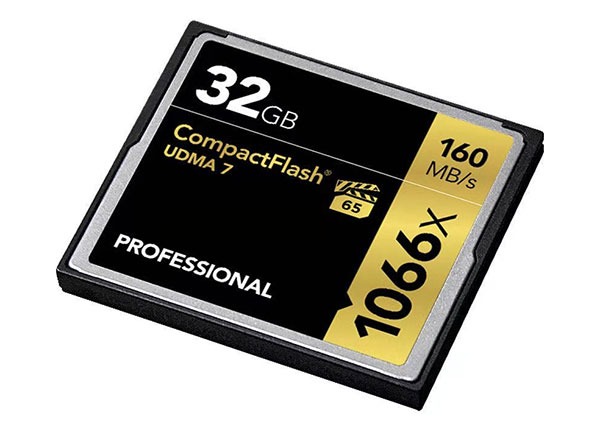
CF Card Types
Traditional CF cards share the same general shape, but differences in thickness, capacity, and speed can affect whether a particular card is suitable for a device.
CompactFlash has two physical types: CF Type I and. CF Type II. Both are approximately 42.8 × 36.4 mm and use the same basic connector. The difference is thickness: Type I is 3.3 mm thick, while Type II is 5 mm thick.
Most flash-based CF cards are Type I. Type II was used mainly for Microdrives, which placed a miniature mechanical hard drive inside a CF-shaped enclosure, as well as for a small number of specialized devices. A Type II slot can generally accept the thinner Type I card, but a Type II card is too thick for a Type I-only slot.
CF Card Capacity
CF cards have been made in capacities ranging from a few megabytes to hundreds of gigabytes. Unlike SD cards, they are not divided into familiar capacity families such as SDHC and SDXC. Usable capacity depends on what the device was designed to recognize.
Some hosts were designed when 256 MB, 1 GB, or 2 GB cards were common and may not recognize a much larger replacement. Device firmware, file-system support, and storage addressing can all set capacity limits. The equipment manual or a verified compatibility list provides a safer capacity guide than the maximum size currently available.
CF Card Speed
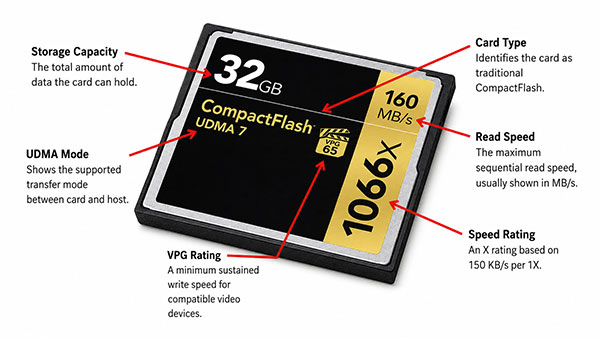
CF card labels may show read and write speeds in MB/s, an X rating such as 133X or 300X, or both. The read speed describes how quickly data can be retrieved from the card. The write speed describes how quickly the card can save new data, which is usually more important for continuous shooting, video recording, or data logging.
In the X rating system, 1X equals 150 KB/s. A 133X rating therefore represents about 20 MB/s, while 300X represents about 45 MB/s. These figures are often maximum transfer ratings rather than guaranteed sustained write speeds, so two cards with similar labels may perform differently in actual equipment.
Some cards also show a UDMA mode or a Video Performance Guarantee rating. UDMA identifies an interface transfer mode, while VPG states a minimum sustained write level for compatible video equipment. Actual performance is limited by both the card and the host, so an older device may not use the full speed of a newer card.
How Does a CF Card Work?
A CF card stores data in flash memory, so files remain on the card when power is removed. An internal controller manages reading, writing, and the placement of data across the memory. The camera or machine sees the complete card as a removable storage drive.
Traditional CompactFlash uses a 50-pin connection and a Parallel ATA, or PATA, interface. Many devices communicate with it in much the same way that an older computer communicates with an IDE hard drive. As a result, the same card format can store photos in a camera or serve as a boot drive in an embedded system.
The receiving pins are located inside the device slot. Insert the card straight and without force; pushing it in at an angle can bend a pin and prevent the device from reading the card.
Are CF Cards Still Used?
Yes, but their role has changed. CF cards are no longer a standard choice for newly designed phones, laptops, or general consumer electronics. New cameras are also more likely to use SD or CFexpress, depending on their performance requirements.
Traditional CF remains relevant because this equipment often stays in operation for many years. When a card fails in a camera, CNC machine, testing instrument, or embedded computer, replacing the card is usually more practical than redesigning the system.
CF is a legacy format with an active replacement market. Current demand comes mainly from older cameras, installed equipment, and industrial systems that require a stable storage configuration. Buyers in these markets usually care more about compatibility and continued supply than the latest storage technology.
What Are CF Cards Used For?
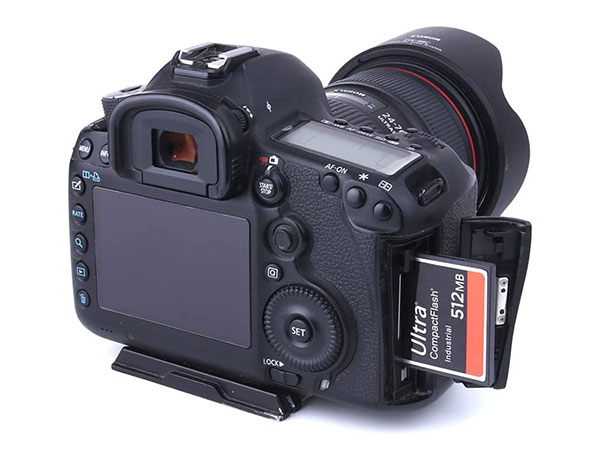
CompactFlash first became widely recognized as a camera memory card. Many professional DSLR cameras, medium-format digital backs, camcorders, and audio recorders used CF because it was easy to handle and provided the capacity and write performance they required. A camera built with a traditional CF slot still records to a traditional CF card.
CF also has a long history in industrial and embedded systems. It may serve as a boot drive, hold operating software, store production data, or record logs inside automation equipment, medical devices, network hardware, and transportation systems. In these applications, replacing an entire system can be much more difficult than replacing its storage card.
Older computers and specialized electronic equipment also use CF. CompactFlash is closely related to the IDE storage interface found in many older computers, so a CF card can operate as a small solid-state drive through a simple adapter. This connection keeps CF in use in retro computers and equipment built around IDE storage.
CF Card vs. SD Card
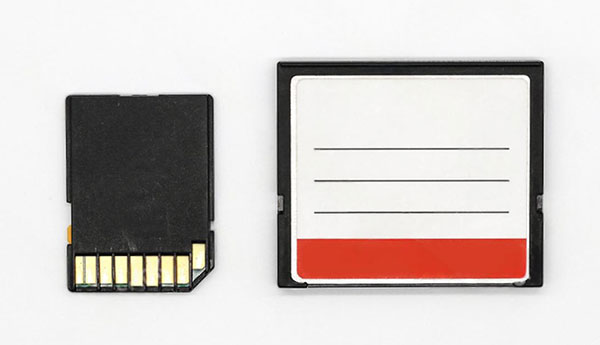
CF and SD cards perform the same basic job: both provide removable flash storage. They differ in physical size, connection, typical equipment, and current market use.
| Difference | CF card | SD card |
| Physical size | Larger and thicker | Smaller and lighter |
| Connection | 50-pin slot | Flat contact pads |
| Typical use | Older professional cameras, industrial and legacy equipment | Current cameras and a wide range of consumer devices |
| Capacity naming | No CF equivalent of SDHC or SDXC | SD, SDHC, SDXC, and SDUC families |
| Direct compatibility | Only with a compatible CF slot | Only with a compatible SD slot |
The device determines whether an SD card can replace CF. SD-to-CF adapters add another controller between the card and the host, and compatibility varies by camera or industrial system.
CF vs. CFast vs. CFexpress
CompactFlash, CFast, and CFexpress are separate formats developed under CompactFlash Association standards. Traditional CF uses PATA, CFast uses SATA, and CFexpress uses PCIe and NVMe. Each format has its own connector and host requirements.
| Format | Interface | Where it is commonly found |
| CompactFlash | PATA | Older cameras, industrial and legacy equipment |
| CFast | SATA | Some professional video and industrial equipment |
| CFexpress | PCIe/NVMe | Newer professional cameras and video equipment |
A CFast card has a shape similar to CompactFlash, but its SATA connector does not fit a traditional CF slot. CFexpress is available in Type A, Type B, and Type C form factors and uses a different connection again. CFast and CFexpress cards cannot replace a 50-pin CF card directly.
How to Choose a CF Card for Your Device
Start with the equipment rather than the card label. Check the following points before selecting a replacement:
- Confirm the format. Match the existing card and equipment manual to traditional CompactFlash, CFast, or CFexpress.
- Check the physical type. Most current flash-based cards are Type I. A Type II card requires the thicker Type II slot.
- Match the supported capacity. Use the device manufacturer’s stated maximum when available. Older hosts often recognize a narrower capacity range than current card readers.
- Choose sufficient write performance. Cameras, recorders, and logging equipment may need a minimum sustained write speed. Extra card speed brings no benefit once the host reaches its own limit.
- Consider the operating conditions. An industrial CF card may run continuously as a boot drive or data logger, while a camera card may be used only during a shoot. Continuous operation, extreme temperatures, and long service periods can require controlled components, higher endurance, and consistent firmware.
- Test the card in the actual device. For legacy or industrial equipment, a sample test is more reliable than comparing specifications alone. Test startup, formatting, reading, writing, and restart behavior under the expected workload.
Conclusion
CompactFlash is no longer the main memory card for new consumer devices. Its market now centers on older cameras, industrial machines, and embedded systems built with a CF interface.
For a replacement card, start with the format, capacity, and speed range supported by the device, then test the card in the actual hardware. Neomory supplies traditional and industrial CF cards for volume projects and provides samples for compatibility testing.
